How to Specify a Marine Touch Display: Salt Fog, EMI, Vibration and Temperature
A ship's bridge looks like a controlled environment. It is air-conditioned, it has a roof, and nobody is pointing a pressure washer at the console. That impression is why marine display projects go wrong: the panel that passed qualification on the bench drifts, fogs or corrodes once the vessel is in service. Most marine display failures are not random. They trace back to a handful of specification decisions made early — sealing specified as a gasket rather than a bonded stack, touch validated in a quiet lab rather than next to a radar, a temperature range that covers ambient but not the panel surface under solar load through bridge glass, a module with no supply commitment behind a vessel that will serve for two decades. This guide walks through those decisions in the order an engineering team actually faces them, for ECDIS consoles, radar and sonar displays, engine-room HMIs and bridge control terminals, and closes with the validation sequence to run before committing a module to a platform. It is tempting to reuse a panel that already passed qualification for a factory HMI. The gap is not quality — it is that the marine environment pushes several parameters past the industrial envelope at the same time, and holds them there continuously. The last row is the one that catches teams late. A display module rarely outlives the platform it is built into, so lifecycle has to be specified at the same time as optics. Salt is the defining difference. Chloride-laden humidity does not stop at the front surface — it migrates along the bonding interface, attacks connector plating and works into any gap in the bezel. A gasket alone will not stop long-term ingress; compression set, UV exposure and thermal cycling all open it up eventually. Bridge glass turns a console into a greenhouse. Brightness is only half the job: an unbonded cover glass adds two air-to-glass reflections of roughly 4% each, so about 8% of ambient light bounces straight back at the operator. Optical bonding replaces the air gap with optical-grade adhesive and cuts reflections to around 1% — a bonded 1000-nit panel reads better than an unbonded 1500-nit one. Projected capacitive touch is the right default for a modern marine UI, but "supports glove touch" on a datasheet often means a 1 mm cotton liner. Navigational and deck gloves are thicker, and on a working bridge hands are frequently wet or salt-damp. Ambient temperature is not operating temperature. A panel behind bridge glass can sit far above the outside air reading, while a cold soak before departure means the LCD starts below its comfortable range and visibly smears for the first minutes. A touch display that is stable on the bench and drifts next to a radar is an integration problem, not a panel defect — but it is your problem either way, and it is the failure most often missed before tooling. Engine and auxiliary vibration is continuous, broadband and runs 24/7 for years. It is a fatigue problem, not a shock problem. The same vessel does not need the same panel everywhere. Specifying per location is usually cheaper than over-specifying fleet-wide. Eight tests, in this order. They catch most of what would otherwise reach service. Marine electronics is a small-batch, many-model business. A console variant for one vessel class might be a few hundred units a year. That volume profile collides with how large display manufacturers work: high MOQs, distributor routing, and no original FAE when something misbehaves. JuTouch builds custom touch display modules for marine and aerospace applications around the constraints above: salt-fog-resistant structural design and anti-corrosion materials, fully sealed optical bonding with humidity-resistant coating, an operating range of -30 °C to +85 °C with wider ranges available on request, anti-condensation optical design and thermal-cycling reliability, EMI shielding with industrial-grade touch controller tuning, and reinforced cover glass with IK-rated protection available as an option. Modules are validated for high and low temperature, dual 85, UV, vibration and impact. The parts that matter to smaller programmes: glove touch, wet-hand touch and sunlight readability are tuned as engineering requirements rather than sold as options; small-batch and multi-model projects are supported without high MOQs; and long-term supply is treated as part of the specification, because a vessel programme runs for years rather than quarters. Engineering works directly with your team from prototype through production, in sizes from 2.8" to 55". -30 °C to +85 °C is the common envelope for marine-rated modules, and it is the range JuTouch builds to, with wider ranges available on request. Confirm the rating covers the LCD, the touch controller and the backlight driver — not just the cell. Radar, VHF and sonar transmitters raise the noise floor around the touch sensor and collapse its signal-to-noise ratio. The fix is a combination of EMI shielding, a defined ground path, and controller filtering tuned against the installed noise — plus validation with the vessel's own equipment running. Not on its own. Gaskets take compression set and harden under UV and thermal cycling. Long-term marine sealing relies on corrosion-resistant materials, a fully sealed optical-bonded stack with no internal cavity where moisture can condense, and humidity-resistant coating on the electronics. 600-1000 nits for shaded consoles angled away from direct sun, 1000-1500 nits as a working baseline, 1500-2000 nits for panels in direct sun through bridge glass or externally mounted. Pair it with optical bonding — a bonded 1000-nit panel reads better than an unbonded 1500-nit one. Specify the stack, not just the panel: a fully bonded optical build with corrosion-resistant materials, brightness matched to the console's real solar load, touch tuned to the thickest glove and to wet hands, -30 °C to +85 °C across every component in the module, EMI headroom validated against the vessel's own transmitters, and a mechanical design built for continuous vibration. Then run the eight tests in order, in the real housing, before tooling money is committed.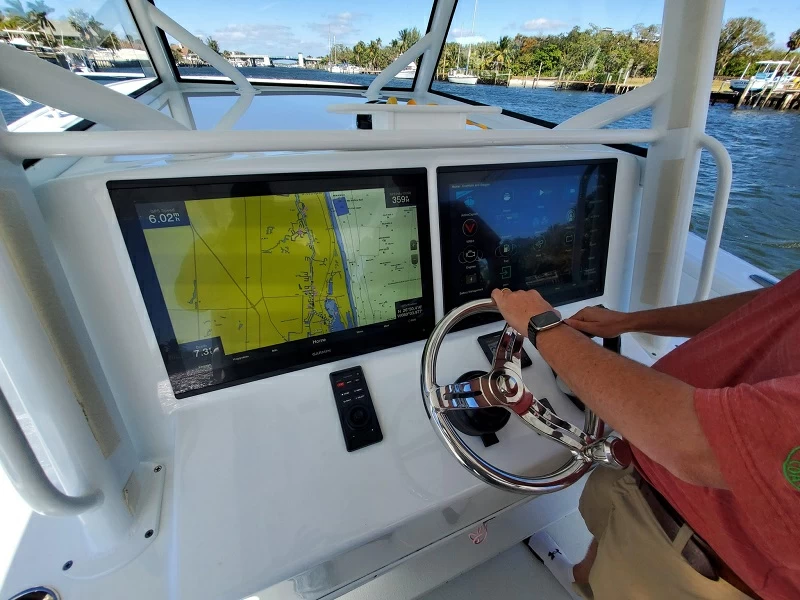
Why marine and aerospace displays fail differently from industrial HMIs
Environment factor Typical industrial HMI Marine / aerospace reality What it breaks Airborne contamination Oil mist, coolant Salt-laden humidity, salt spray, constant high RH Connector and bezel corrosion, delamination at the bonding edge Ambient light 300-800 lux, indoor Direct sun through bridge glass, moving across the panel all day Washed-out image; operators shading the screen by hand Operator input Bare finger, thin glove Navigational gloves, wet or salt-damp hands, moving sea Missed taps, false touches Vibration Fixed machine frame Main engine and auxiliaries, continuous, broadband, 24/7 Connector fretting, FPC cracks, solder fatigue EMI Moderate industrial noise Radar sweeps, VHF and comms transmitters, sonar Touch drift, ghost touches, signal errors Temperature 0-50 °C conditioned -30 °C cold soak to +85 °C panel surface, cycling year-round Slow response, condensation, backlight decay Pressure Ambient, sea level Low pressure at altitude, pressure variation in aerospace duty Sealed cavity stress, condensation Lifecycle 3-5 years Platforms run for decades with mid-life updates EOL panels force re-validation The six specifications that decide whether a display survives at sea
1. Salt fog, humidity and corrosion
2. Sunlight readability on the bridge
3. Glove and wet-hand touch
4. Wide temperature, pressure and condensation
5. EMI and EMC near radar and communications
6. Shock, vibration and impact
Where the display is installed changes the specification
Location Priority requirements Typical traps Bridge console / ECDIS Sunlight readability, polarised-sunglasses compatibility, glove and wet touch, dimming to night watch Specifying brightness but not the optical stack; night dimming range not stated Radar & sonar console EMI immunity, stable touch during radar sweep, low-reflection surface Validating touch on a bench with no transmitter running Engine room Vibration, wide temperature, sealing against oil mist and humidity, readable at a glance Industrial panel with no continuous-vibration validation Externally mounted / open deck Ingress protection, salt spray, IK impact, wide temperature Gasket-only sealing; UV-unstable border ink fading to grey Aerospace ground & airborne Low-pressure behaviour, thermal cycling, weight, long-term availability Passing ambient tests but never testing pressure or cycling How to validate a display before you commit
Where small-batch marine OEMs get stuck
Three problems worth solving before you pick a supplier
How JuTouch approaches marine and aerospace display projects
FAQ
What temperature range should a marine touch display cover?
Why does touch drift when the ship's radar sweeps past?
Is a gasket enough for salt-fog protection?
How bright does a bridge display need to be?
The short version